
You cannot force anyone to open an email. You can control three things that sit in the inbox before they decide: the from line, the subject line, and the snippet.
Get those right and a decent email gets read. Get them wrong and even a newsletter David Ogilvy would have been proud of is a waste of time.
This is the checklist we use on client email and on the Growth Experts newsletter. It assumes the message actually lands. If it does not, that is a deliverability problem, which is a different article.
1. The from line
The from line is your name, your email address, and, as a bonus, your avatar. Its only job is familiarity. People open mail from people they recognise.
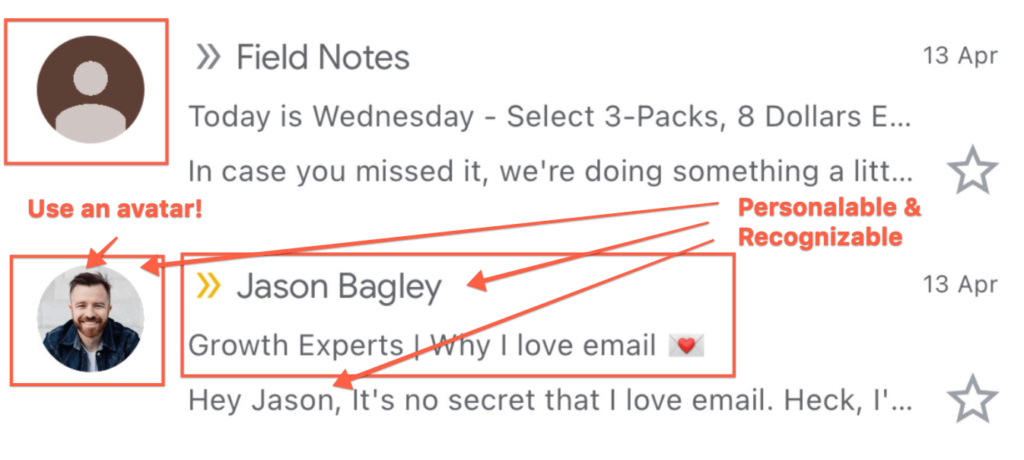 See the difference between my newsletter and the Field Notes newsletter?
You can send as your name, the business, or the newsletter. Pick one and stay there. Switching from “Jason at Growth Experts” to “GE Team” to “Newsletter” trains people to treat you as a stranger every week.
The address should match that choice. I send from a personal address. If you will not, use newsletter@, email@ or team@ on your own domain. A random Gmail, or a different domain from the website, is a quiet reason to skip you.
Avatars do not show in every client, but Gmail does use them. Set one up. James Cridland’s guide is still the clearest walkthrough.
2. The subject line
You can make a lot of other email mistakes and still get the open if the subject line sounds like a note to a colleague.
The best research is already in your inbox. Scroll the messages you actually opened this week. They are usually short, specific, and a little unfinished. They do not shout.
Subject lines that have earned an open from me look like this:
- “A few short updates”
- “Business ideas”
- “Go and read your 2026 goals”
- “Tech businesses is not a niche, Jason”
The last two are ours. They work because they sound like I wrote them to one person, which I did. “OPEN NOW!!! 50% OFF” trains the filter and the reader to ignore you.
A useful test before you hit send: would you put this in a subject if you were emailing one client you already know? If not, rewrite it.
3. The snippet
The snippet is the line next to or under the subject in the inbox. Think of it as the subtitle. If you leave it blank, most tools dump leftover code, a view-in-browser link, or the first sentence of the preview text from the template. That is a wasted line in the one place the reader is still deciding.
Write a custom snippet. Keep the subject short and let the snippet add the next beat. You can personalise it. Do not summarise the whole email. The job is curiosity, not a spoiler.
A simple pattern we use: subject names the thing, snippet names the stakes. Subject: “Boring Google basics still win”. Snippet: “The checks a B2B service business should run every few months.”
A ten-minute check before you send
- Is the from name the same as last week?
- Does the subject sound like a person, not a campaign?
- Did you write the snippet on purpose?
- Would you open this if it came from someone you barely know?
If you have a newsletter about to go out and you want a second pair of eyes, send a test to [email protected]. We will reply with a few notes.
None of this matters if Gmail never shows the row. That is email deliverability.

Jason Bagley
Founder, Growth Experts
I'm a business builder, the founder of Growth Experts, sometimes public speaker, and a member of the Entrepreneurs' Organization. Mostly though, I'm just a dad to Eva & Cruz and a husband to Karina.